Bose shut down the SoundTouch cloud service in early 2026. STR makes those speakers fully usable again without the cloud. Internet Radio, Spotify, your own music and the preset buttons work like they used to.
Ready in 10 minutesBox on Wi-Fi, tap Install in the app, done. No USB stick, no extra hardware, no tech skills. After that STR runs on the speaker itself, your computer can stay off.
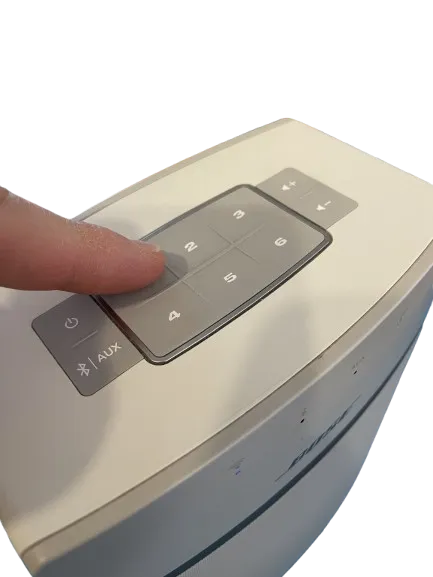
Your preset keys work againThe six keys on the speaker and the remote, just like before.
Free, foreverAn open source project. No fee, no subscription, no cloud.
STR is an Open Source hobby project. It exists because Bose shut down the SoundTouch cloud in early 2026 and turned several hundred euro devices into paperweights. Bose never published official sales figures, but industry reports talk about millions of SoundTouch speakers sold worldwide since the 2013 launch. The cloud shutdown wiped out a huge amount of fully working audio hardware overnight, and that is exactly what kicked this project off. A few weekends of reverse engineering later, the speakers can be operated without that cloud. The goal: hardware that still works should not end up as e-waste just because a vendor pulled a service.
🏆Country rankingWhich country rescues the most speakers?
Total rescued speakers per country.
STR in action
The German YouTube channel gapsed! took an independent look at STR and shows in this video how a silenced SoundTouch speaker plays internet radio again and how the software behind it works. Feedback like this from the community makes my day.
The video is in German.
gapsed! · Bose SoundTouch retten: Die Lösung, auf die ich gewartet habe
From download to your first station playing takes about ten minutes.
STR is software you download, not a device you buy. You do not need a USB stick or any extra hardware. The app installs everything straight over your home network onto the speaker.
What is STR?
A free app for your computer, on Windows, Mac and Linux. Open source under the MIT license. The app puts STR onto the speaker; after that everything runs on the box itself, even with no computer around.
What do you need?
Just your computer and your Bose on the same WiFi. No stick, no adapter, nothing to buy or plug in.
What does it cost?
Nothing. STR sells no hardware and no account. Donations are welcome but optional.
Prerequisite: your Bose needs to be on WiFi
This is the only thing you need to prepare. STR talks to your speaker over your home network, so the Bose has to be connected to your WiFi once. The easiest way is the official Bose app; in its latest version you no longer need a Bose account or the cloud for this. Alternatively, connect the speaker to your router with a network cable. Once the speaker is on the network, the STR app finds it automatically and installs everything else over the network.
1
Download the app
Grab the Windows or Mac version from the Download section below. If you want to be sure, you can verify the SHA256 checksum or the GitHub attestation, instructions in the Verify section. Optional.
Start the STR app on your computer. It finds your Bose automatically on the WiFi and installs STR onto the speaker with one click, straight over the network. It takes just a few minutes, then the box restarts with STR. No stick, no cable, nothing to plug in. Updates roll out automatically over the app after that.
3
Put stations on the buttons
Search for stations in the browser or in the computer app and put your six favorites onto buttons 1 to 6 on top of the speaker. Done. Speaker works like it used to.
What your Bose SoundTouch can do again
Everything from before works again. Plus a few things the Bose app never did.
Everything as before
Internet Radio
Tens of thousands of stations from around the world, with station logos and search by language. Search, play, done. No account, no app sign up.
Beta
Spotify Connect
Spotify now plays straight on the speaker, with no Bose app at all. Put your playlists on buttons 1 to 6 and hear them at the touch of a button, with the track and artist shown in the app. Several Spotify accounts in one household and shuffle work too. Still a beta, you need Spotify Premium.
Your own music
Play the music stored on your home network, from a NAS or your router, right on the speaker. Browse it in the app and put any track on a button. Nothing leaves your home. Under the hood it uses the open DLNA and UPnP standards.
Hardware buttons 1 to 6
The favorite station buttons on top of the speaker work again, even right after you switch it on. A short press plays at once, a long press puts the current Spotify playlist on that button.
New, never in the original
New
Groups that stay
Set up a speaker group once and it stays. Through standby and a restart, with no setting it up again.
New
Actions on the buttons
Put your own action on a button, like switching a light when you press it.
New
Sleep timer
Set a timer and the speaker, or the whole group, switches itself off after the time you set.
Users tell us the app runs smoother for them than the original.
The app in real use
This is what the STR app looks like on your computer. Search for stations, put them onto the hardware buttons, configure the speaker, all from one place.
Listen to music
All speakers found on your network, pause and stop, AUX and Bluetooth, volume. The six preset buttons mirror the hardware layout.
Find stations
Search the radio-browser.info catalog of over 50,000 stations. Filter by country, language, genre, only working or only speaker compatible streams.
Network library
Browse music servers on your network such as FRITZ!Box, Synology, Plex or miniDLNA and play tracks straight to your speaker.
Speaker settings
Set name, volume and bass on the speaker. See WLAN status, configure a different WLAN if needed.
More settings
Display language, clock format, AirPlay optimization, active sources and the default region for station search.
Status and actions
Update state, re-sync the hardware preset buttons, restart the speaker. Plus speaker info like model and firmware.
Screenshots are from the running beta, each shown in its own language. Sensitive data like IP address, WLAN name, device ID and serial number is blurred.
Control it from Android and iPhone
Every speaker serves its own phone remote in the browser: Android, iPhone, iPad or any tablet, with no app store and no account. Scan the QR code in the computer app's speaker settings once, add the page to your home screen, and it works like an app.
Play, volume and presets
What is playing right now, the volume, and the six preset keys, on your phone.
Find stations and music
Search the worldwide station directory and your own music library, play with one tap or put it on a preset key.
All speakers and groups
Every speaker in the house on one page: group them for multiroom and manage the music sources.
Tip: choose “Add to Home screen” in the browser menu and the remote opens full-screen like an app.
These screenshots show the real phone remote exactly as a speaker serves it.
Roadmap, honest
What works, what is next, and what I do not feel ready to promise. As of today, no marketing fluff.
Working
•Internet Radio via speaker and buttons 1 to 6
•Spotify straight on the speaker and on buttons 1 to 6, as a beta
•Group several speakers to play in sync as a multiroom group
•Pair two speakers as a real stereo pair with separate left and right channels, still a beta
•Play music from local media servers on your home network, from a NAS or home server over DLNA and UPnP
•Map smart home actions onto the buttons on the speaker and the remote
•Control speakers from your phone by scanning a QR code in the desktop app, all on your home WiFi with no app to install
•Setup wizard for Windows and Mac
•Auto discovery of every speaker in the home network that already runs STR
•Updates through the desktop app
•Switch AUX, Bluetooth and standby from inside the app
•Reconfigure Wi-Fi from the app, no stick and no Bose account needed
•AirPlay 2 keeps working on models that already support it, namely the SoundTouch 10 and the 20 and 30 each in Series III, no Apple and no Bose account. STR does not upgrade older models to AirPlay 2.
•Clean uninstall wizard for selling or passing on a speaker
Working on now
•Getting Spotify from beta to a stable state
•Deezer: bringing your Deezer favourites onto the buttons.
Maybe later
•TIDAL and Amazon Music Connect integrations
•Mobile app if the community needs one
•Linux desktop app to beta quality
•Podcasts: search a show and put it on a button so the newest episode plays at a press.
The order is not set in stone. If you need something urgently, drop me a message or open an issue, that shifts priorities.
Works with
I have verified the SoundTouch 10 and the SoundTouch Portable on real hardware, and the 20 and 30 run just as well on the same platform. And here is the genius part: now that STR installs over the network, every single SoundTouch runs STR. Even the three devices people ask about most, the ones that used to be left out because they are built on a very different platform, are now on board: the SoundTouch SA-5 amplifier, the Wave SoundTouch series IV and the SoundTouch 300. All from the same download, with no USB stick.
SoundTouch 10Works, verified on hardware
SoundTouch PortableWorks, verified on hardware
SoundTouch 20Works, verified on hardware
SoundTouch 30Works, verified on hardware
SoundTouch SA-5 amplifierWorks, verified on hardware
Wave SoundTouch series IVWorks, verified on hardware
SoundTouch 300Works, verified on hardware
SoundTouch SA-4 amplifierWorks, verified on hardware
Wave SoundTouch series IIIWorks, verified on hardware
CineMate with SoundTouch adapterWorks, verified on hardware
SoundTouch Wireless Link adapterWorks, verified on hardware
Lifestyle with SoundTouch adapterWorks, verified on hardware
Bose and SoundTouch are trademarks of Bose Corporation. This project is not affiliated with Bose.
Help out
STR lives off you and other SoundTouch owners. You do not need to code to help, sometimes a short note about what works or does not is exactly what I need.
Right now I need one thing above all: SoundTouch owners in every country hearing about STR. YouTube and social media work best for that. If you want to help, talk about STR, share this site, or send your favourite tech YouTuber a short note asking if they would like to cover STR. A single video can save hundreds of speakers from the trash.
Open Source and verifiable
What I say on this page you can check yourself or with a bit of help. No promises, just facts to look at.
Source is open
All the code is on GitHub. Read it, fork it if you do not like a part, make your own version. MIT licensed, you do not need to ask.
Signed by the build pipeline
Every download has a SHA256 fingerprint and a GitHub build attestation. If you want to be sure, the Verify section below shows how.
What STR leaves open on your network
So you know what STR newly adds: the STR control page on port 8888 runs without a login, anyone on the same WiFi can change presets or trigger playback through it. The connection between the desktop app and the speaker is unencrypted. Both are intentional, the WiFi is the trust boundary of the project. If you have unknown devices on your home network, you should be aware of this.
Your data stays home
STR and your speaker only talk inside your WiFi, plus radio-browser.info for the station search. At startup the desktop app briefly checks st-reborn.de for updates and reports only anonymous basics like version, operating system and language. No account, no cookies, no stored IP, no profile. You can turn the check off and the app still runs.
Build it yourself
If you build the source with the same tools as me, you get the same binary bit for bit. It is documented, ping me if it does not work.
Report a security issue
Found a bug or a security issue? Report it on GitHub or by email. I usually reply within a day or two.
Bose firmware stays untouched
The official Bose firmware is not modified. STR lives only as extra files in the internal storage. A factory reset of the speaker resets the Bose software but leaves the STR files in place. To take STR off completely, use the clean uninstall built into the app, which returns the speaker to its original Bose state.
Download
Grab the Setup Wizard for your computer. It installs STR onto your Bose SoundTouch once over your home network, with no USB stick. The same app then also runs day to day: it controls the speaker, finds stations and puts them on the hardware preset buttons 1 to 6.
No USB stick and no extra hardware. STR installs straight over your home network onto the speaker.
Your Bose SoundTouch switched on and on the same home network as the computer. How to get the speaker onto WiFi is explained higher up on this page.
This will not work on your phone
These downloads are meant for a Windows PC or a Mac, not for your phone or tablet. STR does not run on a phone. Open this page on your computer, on the same WiFi as the Bose speaker, and download it there. Tap the button again if you still want to save the file to this device.
Windows Setup Wizard
Guided one-time install over the network. After that the same app controls every speaker running STR on your WiFi.
Windows 10 or 11 (64-bit). Windows 7 and 8 are not supported.
Every download can be verified. This way you know the file came from the official GitHub build pipeline and was not tampered with in transit.
This is optional. The download works fine without it. These steps are just for anyone who wants to be extra sure.
Method 1: SHA256 checksum
Compute the SHA256 hash of your downloaded file and compare it with the value on the Release page. If hashes match, the file is unchanged.
# Windows PowerShell
Get-FileHash .\STR-Windows-v0.9.70.exe -Algorithm SHA256

# macOS oder Linux
shasum -a 256 STR-macOS-v0.9.70.dmg
Method 2: GitHub build attestation
Using the GitHub CLI you can cryptographically prove the binary was produced by the official build pipeline. This still works even if someone tampered with the checksum afterwards.
No. STR now installs straight over your home network. The app finds your Bose on WiFi or LAN and pushes all the needed firmware packages onto the speaker over the network in a few minutes, with no USB stick, no adapter and no extra hardware. Once the box restarts with STR, it is set up. For the rare case where a speaker cannot be reached over the network, the app still offers the classic USB stick route as a fallback.
Is my Bose SoundTouch still safe afterwards?
Yes, even safer than before. STR does not modify the official Bose firmware. During installation STR writes a few files into the speakers internal NAND (under /mnt/nv/streborn/), including the STR agent itself and its configuration. They run as an additional process alongside the Bose software. Security note on the network install: to push the agent, STR briefly opens the maintenance access that the Bose firmware ships with, then closes it again as soon as the install is done. So the only exposure window is the short install itself, and the app shows a banner during that phase. A factory reset only rolls back the Bose software, the STR files stay in place, see the next question if you ever want to pass the speaker on.
Does my computer have to stay on for the speakers to play?
No. STR is installed onto the speaker once through the app and runs there permanently. The preset keys, internet radio, Spotify and the phone control keep working with no computer switched on. You only need the computer app for setup, for updates and for conveniences like searching stations on a big screen.
I opened the speaker's IP address in the browser and only see a Bose page. Where is the phone remote?
Without a port number the browser lands on the speaker's built-in Bose page, which is normal. The STR remote has its own address with a port number. Open the speaker's settings in the computer app: it shows the QR code with the full address right under it. Scan the QR code with your phone camera and your phone lands straight on the right page, ready to be added to your home screen.
Does my speaker need a specific Bose firmware version?
Yes. STR expects the last official Bose firmware, 27.0.6. It is the final version Bose rolled out to all SoundTouch models in 2022, nothing newer exists. You do not need to check the version yourself: the app reads it automatically before the install and lets you know if your speaker still runs an older firmware. In that case, update the speaker once through the official Bose SoundTouch app or with the Bose USB update tool, both still work, and setup then continues on its own. An install on an older firmware may work in individual cases, but I cannot promise that.
The update to Bose firmware 27.0.6 keeps failing. What now?
A tip from the community, no guarantees: on some speakers the direct jump to 27.0.6 does not work, the update aborts or the box keeps restarting. What has helped is a detour: first install an older SoundTouch firmware from a USB stick, then update to 27.0.6 as usual. The SoundTouch Firmware Downgrade Guide in the community wiki describes this step by step. Also important: older SoundTouch models of series I and II only use 2.4 GHz Wi-Fi. If your router broadcasts on 5 GHz only, the speaker cannot find the network, so enable the 2.4 GHz band as well. Thanks to Jos from the community for this tip.
What do I need to do if I sell or pass on my speaker?
A factory reset through the Bose app only clears Bose-owned data such as WiFi, account and Bose presets. The STR files stay in place, so STR keeps running after the reset. To hand the speaker on in real stock state, there is now a clean uninstall built right into the app. The wizard removes STR completely and returns the speaker to its original Bose state, ready to sell or pass on. If the new owner just wants to keep using STR, all they need is to set the WiFi via the app and put their stations back onto buttons 1 to 6.
How do I remove STR again?
Straight from the app, in one step. There is nothing to back up first, because nothing of the original state gets overwritten: STR lives in its own folder in the speaker memory and hooks itself in at startup, the Bose firmware itself stays untouched. There are two ways. Uninstall removes STR completely and restarts the speaker as a plain Bose, still on your WiFi. That is the way to go before selling it, or if you want to install STR again later. Factory reset clears the Bose side, meaning WiFi, account and Bose presets, but keeps STR installed. Worth knowing: a factory reset from the Bose app does the same, it does not remove STR. If an STR USB stick is still in the speaker, pull it out before uninstalling, otherwise it installs STR again on the next start.
What if Bose lets the old cloud domains expire one day?
Right now the old Bose cloud domains like streaming.bose.com are still registered to Bose, they just no longer respond. If Bose ever lets them lapse and someone re-registers them, that party could in theory remote-control an untouched SoundTouch, the Bose firmware trusts those hostnames implicitly. STR addresses this in two ways: first, the affected hostnames are pinned locally to 127.0.0.1, so the speaker no longer sends those requests out at all. Second, STR creates a per-speaker local TLS CA that is only valid for these exact hostnames and never leaves the device. Even if one of the old cloud domains ends up in the wrong hands, your speaker with STR stays protected.
The app does not find my SoundTouch. What now?
In the current version the app main list only shows speakers that already have STR installed. A factory speaker that has not been touched yet will not appear there, even if your PC can ping it on the same network or the Bose app used to find it. So this is not a firewall, WiFi or mDNS issue, just how the app currently behaves. To set up a new box: make sure the Bose is on the same home network (see above) and start the install in the app. STR installs onto the speaker over the network, with no USB stick. Once the speaker reboots with STR firmware, it shows up in the list automatically.
How do I change the stations on the preset keys?
Through the station search in the app. Type the station name, click Search, and on the match choose “Assign to key”; the app then asks which of the six keys should hold it. From then on that key on the speaker starts exactly this station. If a station you want to keep is playing right now, long-press the key in the app and the running station is saved there. The phone page works the same way via the Search tab.
My speaker stops reacting to the preset keys after a longer break. What now?
Some speakers silently lose their internal sign-in after a long idle period or a power off and then refuse every key press. The quick fix: unplug the speaker for ten seconds, after that the keys work again. Version 0.9.21 already makes this much rarer, it fixes a connection bug that could swallow key presses. A coming update closes the last gap by storing presets in a more robust format on the speaker.
My Wave plays the station but shows UNAVAILABLE or no station name.
That is a display quirk of the Bose firmware on the Wave, not a playback problem. On a key press the box first tries its old cloud path, which goes nowhere, then STR takes over playback. Whether the station name survives on the display is unfortunately up to the firmware. The music always plays correctly. A permanent fix is in the works that will bring the names back reliably.
Why is a speaker greyed out in the app?
Grey means seen but currently unreachable: the speaker is in deep standby, unplugged or rebooting. It deliberately stays in the list so it does not seem to vanish, and the tooltip tells you when it was last seen. As soon as it answers again the tile comes back to life on its own. A speaker in deep standby is woken at the device itself, that saves power and is intentional.
My Spotify preset plays a foreign or wrong playlist.
This happened when Spotify autoplay was running at save time: instead of your playlist, its temporary radio spin-off got stored, which later leads nowhere. Since version 0.9.21 STR always stores the real playlist and also self-heals previously saved keys on recall. If a key still plays the wrong thing afterwards, just save it once more while the playlist is playing.
Why does the app ask for local network access on startup?
Because without it STR cannot find your speakers at all. On startup the app looks for every SoundTouch on your home network that runs STR, connects to them to control playback and put stations on the buttons, and fetches the station list from radio-browser.info over the internet. That is all it does, there is no central server and no data is collected. On Windows the firewall asks once on first launch whether the app may communicate on your networks. Allow access for private networks, meaning your home network, public networks are not needed. If you deny it, the app still starts but will not find any speakers.
A radio station is missing. Do I need TuneIn?
No. STR does not use TuneIn; it searches radio-browser.info, a free community directory. A station missing there is missing in STR, and one you add works for everyone. The easiest way is to let an AI gather everything the Add station form needs. Paste the following into a chatbot like ChatGPT and fill in your station's name. "I want to add the internet radio station NAME to radio-browser.info. Give me, ready to copy, the direct audio stream URL (the real stream, not the web player page), the homepage, a direct https logo image URL, the country and its two-letter code, the language, a few tags, and the bitrate and codec if you know them. If you are not sure of the real stream URL, say so instead of guessing." Then open the stream URL in your browser or in VLC and confirm you actually hear the station, because an AI sometimes invents one that looks right. Add the details at radio-browser.info under Add station, and it appears in STR after a short check, ready for a preset key.
Do I need technical knowledge?
No. The Setup Wizard walks you through every step. You just need your Bose on the same home network and about ten minutes.
How do I install the app on Linux?
The Linux version is the same graphical app as on Windows and macOS, it just ships as a tar.gz archive instead of an installer. Using Linux Mint or Ubuntu as the example: extract the downloaded file with a right click, open the extracted folder, right click inside it and choose "Open in Terminal". Install three system libraries once with sudo apt install libgtk-3-0 libwebkit2gtk-4.1-0 libsoup-3.0-0 and then start the app with ./STR-Linux-x64. If you also run ./install.sh in the same folder, ST Reborn appears in your application menu with its icon, no administrator rights needed. On other distributions the three packages have slightly different names, the README file inside the archive lists the commands for Fedora and Arch.
Why did Bose shut down their cloud?
Bose ended the SoundTouch cloud service in early 2026. Streaming services, preset buttons and the Bose app stopped working. The speakers became partially useless overnight.
What still works after the cloud shutdown, even without STR?
A few things keep working straight on the device, no STR needed. Bluetooth and the AUX input are independent of the cloud and play as before. Apple AirPlay 2 still works on SoundTouch 10 and on SoundTouch 20 and 30 Series III, which Bose added back then via firmware 24.0.7. Spotify is back as a beta and now plays straight from my app on the speaker, without the Bose app, you need Spotify Premium. What Bose actually shut off and what STR brings back: Internet Radio, the hardware preset buttons 1 to 6, and managing stations without the Bose app.
Can I still use the Bose app and other apps?
Yes. STR does not replace the Bose firmware, it sits alongside it, so the speaker stays reachable for other programs on your home network. The official Bose app still finds your speaker, and everything that runs locally, such as power, volume and setting up WiFi, works there even without a Bose account. Everything in the Bose app that went through the cloud, meaning account, station browsing and storing presets, stays dead. That is down to the shutdown, not to STR. So you manage your stations and buttons 1 to 6 in the STR app. Other local controls keep working too, Home Assistant for example.
Can I control my speakers with Alexa?
Not directly, but there is a way round. The old Alexa control ran through the Bose cloud: Alexa talked to Bose, and Bose talked to your speaker. Both halves are switched off, which is why the old Alexa skill cannot be brought back, by anyone. I deliberately do not build a new one. It would need a server on the internet, an account and running costs, and it would open a door to your speaker from outside. STR runs at your home only, with no account and no cloud. What does work is a hub on your own network, Home Assistant for example. It talks to your speakers and offers them to Alexa. That gives you switching speakers on and off, changing the volume, and starting your presets by voice, for example "Alexa, turn on kitchen preset 2". Free speech like "play station X" is not part of it. This is for anyone happy to run a small server. If that is not for you, you lose nothing: the app and the phone remote control everything without it. Guide: Setting up voice control. Alexa and Amazon Echo are trademarks of Amazon, Home Assistant is a trademark of the Home Assistant project. STR is affiliated with neither.
What does the AirPlay optimization setting do?
It keeps the AirPlay coprocessor awake so AirPlay starts faster and stays reliable. The setting only exists on speakers with AirPlay hardware. On means faster and more reliable AirPlay, at the cost of a little more power. Off means deeper standby and longer battery life, but AirPlay reacts a bit slower. Leave it on if you use AirPlay regularly. On a battery-run Portable you rarely stream to, turn it off. Changing it briefly restarts the speaker.
Which stations can I listen to?
Any station listed in the radio-browser.info catalog. That is currently over 50,000 stations worldwide, the community keeps adding more. If your favorite station is missing, you can submit it at radio-browser.info for free, it then appears in STR automatically.
What format does a radio station need?
Almost every web radio station works. Recently many stations that used to time out play too, like BBC Radio 4. A few very rare formats the speaker still cannot play. If your favorite station is missing entirely, you can add it yourself at radio-browser.info, free and without an account, and it shows up in STR shortly after.
Can I play music from my NAS, for example a Synology?
Yes. The Library tab in the app lists every media server on your home network automatically, including Synology, FritzBox and others. Browse to your playlist or album, play it directly on the speaker, and put it on one of the keys 1 to 6. After that the key on the device starts the music straight from the NAS, the app does not need to be running.
Does Home Assistant work with STR?
Yes, with no extra work. Home Assistant ships a Bose SoundTouch integration that talks to the speaker directly on your home network, and that local interface is exactly what STR keeps alive. Add the integration in Home Assistant and enter the speaker IP, then power, volume and the STR preset keys work from there too.
After switching my group on, only one speaker starts.
That is intentional: STR never wakes a speaker on its own, so no box ever turns on uninvited. Switch the second speaker on once by hand and the group plays together again. A convenience option that wakes the whole group together is on the wish list.
Is my data being collected?
No. There is no central server. Everything runs in your home network. The website itself uses a minimal cookie-free analytics that does not identify individual visitors.
When will other models be supported?
Good news: by now every SoundTouch model runs STR. Since the install works over the network, the former exceptions are on board too, namely the SoundTouch SA-5 amplifier, the Wave SoundTouch series IV, the SoundTouch 300 and the CineMate systems with the SoundTouch adapter. Should some very unusual device ever turn up that does not run, your donation helps me buy used hardware to test it.
I need help, where do I ask?
Open an issue on GitHub or send me an email. Usually answered same day.
Why would someone do this for free?
Out of frustration with throwaway hardware and a love of reverse engineering. Donations fund the hobby and pay for additional speaker models to test. Nothing is required.
Thanks
STR only exists because other people give their work away. Here are the projects without which this would not be possible.
App and speaker agent
radio-browser.info: Community catalog of 50,000+ internet radio stations, free to use, no API key. The station search in STR runs entirely on it.
go-librespot: Spotify Connect client by devgianlu (GPL-3.0) behind the Spotify support in STR. Runs as a separate, standalone binary. STR builds it from a small public fork that adds raw-Ogg passthrough (upstream: github.com/devgianlu/go-librespot).
Wails: Cross-platform desktop framework, Go in the back, web in the front. Bridges the STR desktop app.
gorilla/websocket: WebSocket library for Go. Hooks into the internal Bose firmware bus and catches the hardware preset buttons 1 to 6.
grandcat/zeroconf: mDNS service discovery for Go. Lets the desktop app find the SoundTouch automatically on the LAN.
skip2/go-qrcode: QR code library for Go. Generates the QR codes in the app that open a speaker's phone remote directly on your phone.
Octicons: Icon set by GitHub (MIT). Provides some of the interface icons in STR.
Mozilla CA Certificate Store: Mozilla root certificate store (MPL-2.0), redistributed by the curl project. Some speakers do not know a few of these authorities, so STR adds them in memory only while connecting.
Vite: Frontend bundler in the STR desktop app. Active locally during build, not shipped in the bundle.
Sigstore: Build provenance for every release. Makes the build trail cryptographically verifiable, see Verify above.
GitHub Actions: CI/CD ecosystem that builds, checks and signs every release.
Linux + BusyBox: Run on the Bose SoundTouch speakers themselves. Without this GPL base STR would not be possible, the STR agent builds directly on top of it.
This website
Astro: Static site framework. Ships the page you are reading right now.
Tailwind CSS: Utility-first CSS framework. Keeps the styling small and consistent.
GoatCounter: Privacy-friendly visitor counting, no cookies, no persistent visitor ID.
go-librespot is licensed under the GPL-3.0 and ships alongside STR as a separate binary. The STR code itself stays under the MIT license. The complete corresponding source is available in the fork: github.com/JRpersonal/go-librespot
STR contains third-party software. Which parts those are, under which license they stand and where the corresponding source lives is listed in full in the license notices: THIRD-PARTY-NOTICES.md
Community reverse engineering
STR ships none of these projects' code, but several of its central mechanisms would not exist without what they published. Most of them accept no support at all.
Bose-SoundTouch by gesellix: Documented the account and service schema that lets a speaker register its sources again, which is what makes the preset buttons work without the Bose cloud.Donate
SixBack by Dirk Tostmann: Showed how a speaker distinguishes a source it does not know from one it cannot log into, which is why STR can now tell those two failures apart.Donate
soundcork by deborahgu: Wrote down the Bose cloud API from real speaker traffic, the reference STR checks its own emulation against.
BoseSoundtouch by TimoGo: Documented the speaker command sequence for joining a Wi-Fi network, including the detail the official service manual leaves out.
Soundtouch-without-the-app by bosefirmware: Collected the firmware images and cloud-free operating notes STR uses to tell speaker generations apart.
bosesoundtouchapi by thlucas1: The most complete public description of the speaker's own control API.
libsoundtouch by CharlesBlonde: The original community library for these speakers, and the first description of their live event stream.
opencloudtouch: A parallel effort to keep these speakers alive after the shutdown, and a useful cross-check on findings.Donate