For every Bose SoundTouch model
Your Bose SoundTouch works again. Without the cloud.
Bose shut down the SoundTouch cloud service in May 2026. STR makes those speakers fully usable again without the cloud. Internet Radio, Spotify, your own music and the preset buttons work like they used to.
Windows 10 or newer, a Mac, or LinuxVersion 1.8.0


- Open source and free
- Bose firmware stays untouched
- Fully reversible at any time
STR is alive all over the world
Drop a pin on the map and pick a reaction to show your speaker is alive again. New visitors can see at a glance where STR is already in use.
- speakers back in service
- countries
Loading map
Map could not be loaded.
Tap anywhere on the map. Your position is stored deliberately coarse, never house level.
Emoji by OpenMoji · CC BY-SA 4.0
Country rankingWhich country rescues the most speakers?
Total rescued speakers per country.
STR in action
The German YouTube channel gapsed! took an independent look at STR and shows in this video how a silenced SoundTouch speaker plays internet radio again and how the software behind it works. Feedback like this from the community makes my day.
The video is in German.

The video is hosted on YouTube. It only loads after you press play, which sends data to Google. See the privacy policy for details.Watch directly on YouTube.
Three steps back to radio
From download to your first station playing takes about ten minutes.
Download the app
Get the STR app for Windows, Mac or Linux from the Download section below.
Go to downloadInstall STR
Start the app. It finds your Bose and installs STR with one click. After a few minutes the speaker restarts, done.
Put stations on the buttons
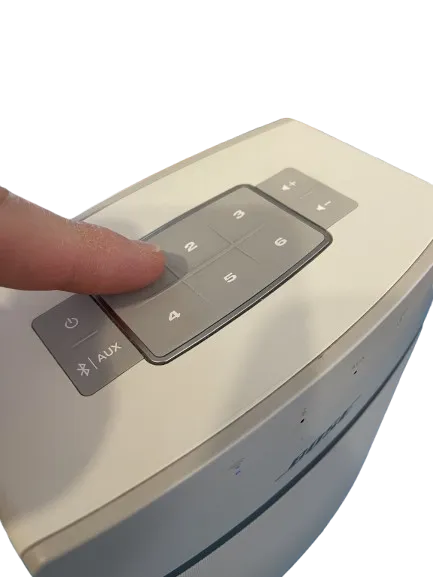
Search for your favourite stations and put them on keys 1 to 6. From then on your speaker plays just like it used to.
Prerequisite: your Bose needs to be on WiFi
That is the only preparation. Connect the Bose to your Wi-Fi once, easiest with the official Bose app, which no longer needs an account for this. Or plug it into your router with a network cable.
What your Bose SoundTouch can do again
Everything from before works again. Plus a few things the Bose app never did.
Everything as before
- Internet RadioTens of thousands of radio stations from around the world, with station logos and search by language. Search, play, done. No sign-up, no account.
- Spotify ConnectPick your speaker in the Spotify app and the music plays. Your favourite playlists go on keys 1 to 6. Several Spotify accounts in one household work too. You need Spotify Premium.
- Hardware buttons 1 to 6The favorite station keys on top of the speaker and on the remote work again, even right after switching on. A short press plays at once, a long press saves whatever is playing on that key, just as the speaker always did.
- Your own musicPlay your own music collection from a NAS or your router straight on the speaker. Browse in the app and put albums or playlists on a key. Nothing leaves your home.
- Multiroom and stereo pairPlay several speakers at once or pair two SoundTouch 10 as a stereo pair. A pair you set up in the Bose app is kept.
- Control from your phoneEvery speaker brings its own remote for your phone's browser, on Android and iPhone, with no app store and no account. It takes over what you used the Bose app for as a remote: play, volume, standby, the six presets, station search, your own music and groups.
- Updates from your phoneOne tap on your phone installs new STR versions on all your speakers, no computer needed.
In the US, Pandora and iHeartRadio stay on your speaker.
New, never in the Bose app
- Twelve presets on six keysPress a key on the speaker twice and it plays a second row of six more stations or playlists. That puts twelve favourites on the six keys, right on the speaker and without a phone. The Bose app only ever had six.

- Stickers for your speakersPrint a sticker for every speaker that shows what is on each key. A QR code on it opens the remote on your phone. The app makes one sheet for all your speakers, shaped to fit each model.

- Thumbs up for Spotify songsThe thumbs keys on the Bose remote now work with Spotify. Thumbs up saves the song that is playing to your Liked Songs, thumbs down takes it out again. Bose never gave these keys a job for Spotify.
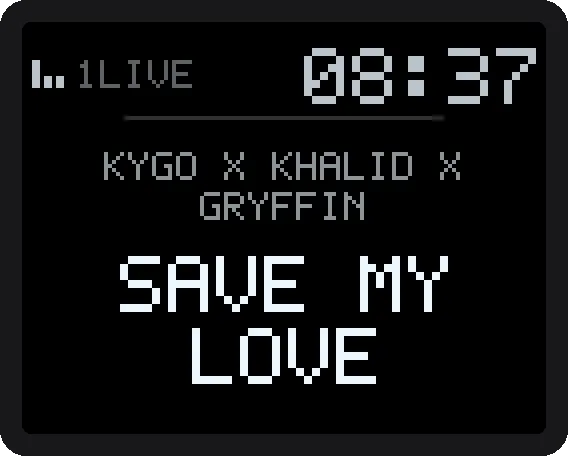
- Now playing on the speaker displayOn every SoundTouch with a display (20, 30, Portable) you see what's playing: station, artist and title, and the time if you like.
- Alarm clockSet an alarm on the speaker itself, with weekdays, volume and a switch-off time. It wakes you with one of your six keys, so with your station or your playlist, and turns itself off again afterwards. The alarm lives on the speaker, so it runs with the computer and the phone switched off.
- Your remote controls your smart homeThe lower keys on the remote can control your smart home if you like, for example the living room lights. Works with Home Assistant and similar systems.
- Groups that staySet up a group once and it stays. As soon as the main speaker plays, the others join on their own, even after standby and a restart.
- Sleep timerSet a timer and the speaker, or the whole group, switches itself off after the time you set.
Users tell me the app runs smoother for them than the original.
The app in real use
This is what the STR app looks like on your computer. Search for stations, put them onto the hardware buttons, configure the speaker, all from one place.


Screenshots from the current version. Personal data is blurred.
Every speaker brings its own phone remote, for Android, iPhone and tablet, with no app store and no account. Scan the QR code from the computer app once, done.


Real screenshots of the phone remote.
Prefer an installed app? Community apps for iPhone and Android
The community decides what comes next
Ideas from the community, sorted by votes. Vote, or suggest something yourself.
Version 1.8.0Released 18 Nov 2026
Most wanted
- Android app for the phone remote63votes
- Deezer36votes
- Voice control (Siri, HomeKit, Alexa)30votes
- Play music from a USB stick plugged into the speaker25votes
- Podcasts on the speaker and on the preset keys18votes
- Volume levelling between radio stations12votes
- Standby clock styles: animated, analogue, centred vertically11votes
- dimming function for the clock10votes
- Tidal7votes
- Pick a Spotify playlist for a preset key from a list7votes
How to vote: open an idea, sign in with a free GitHub account, and click the ▲ arrow next to the title. One vote per idea; click again to take it back.
Recently done
Wishes that made it into STR in the last three months. Your vote counts.
- 12 presets via double-press
- Snooze button?
- Add button to remove favorite in phone remote.
- Spotify playlist on a preset key: choose shuffle
- Waking one grouped speaker wakes the whole group
- Show the current Spotify track on the speaker display (same opt-in as radio ICY)v1.0.13
- Show the current title on the speaker display without the ~1 s audio gap (like the old Bose cloud)v1.0.13
- Clock on the display while streamingv1.0.13
- Pandora (US)v1.0.13
- Update speakers from the phone, without a PCv1.0.13
Works with
Every SoundTouch model runs STR and has been checked on real hardware, including the SA-5, the Wave and the SoundTouch 300. One download for all.
 SoundTouch 10
 SoundTouch Portable
 SoundTouch 20
 SoundTouch 30
 SoundTouch SA-5 amplifier
 Wave SoundTouch series IV
 SoundTouch 300
 SoundTouch SA-4 amplifier
 Wave SoundTouch series III
 CineMate with SoundTouch adapter120 · 130 · 220 · 520 · SoundTouch 520
 SoundTouch Wireless Link adapter
 Lifestyle with SoundTouch adapter135 · 535 · 600 · 650
Bose and SoundTouch are trademarks of Bose Corporation. This project is not affiliated with Bose.
Open Source and verifiable
What I say on this page you can check yourself or with a bit of help. No promises, just facts to look at.


Source is open
All of the code is open on GitHub. You may read it, copy it and build on it without asking.
Signed downloads
The app is signed for Windows and Mac, so your computer recognises it as genuine. If you want to check more closely, the guide is in the download section.
Bose firmware stays untouched
The Bose software is not changed, STR is only added. A factory reset leaves STR in place. One click in the app removes STR completely.
What STR leaves open on your network
So you know what STR brings along: anyone on your Wi-Fi can control your speakers through STR, without a password. The connection on your home network is not encrypted. If there are devices on your Wi-Fi you do not know, you should be aware of this.
Your data stays home
Everything runs on your home network. Only the station search asks the free station directory radio-browser.info. At startup the app checks st-reborn.de for updates and sends only anonymous basics like version, operating system and language. No account, no cookies, no stored IP, no profile.
Build it yourself
If you like, you can build the app yourself from the code. The guide is on GitHub.
Report a security issue
Found a bug or a security issue? Report it on GitHub or by email. I usually reply within a day.
Download
Get the ST Reborn app for your computer. It installs STR on your SoundTouch, and afterwards you use it to control your speakers and put stations on keys 1 to 6.
What you need
- Windows 10 or newer, a Mac, or Linux
- No USB stick and no extra hardware. STR installs straight over your home network onto the speaker.
- Your Bose SoundTouch switched on and on the same home network as the computer. How to get the speaker onto WiFi is explained higher up on this page.
This will not work on your phone
The app is for Windows, Mac and Linux, not for phones. Open this page on a computer on the same Wi-Fi as your Bose and download it there. You get the phone remote afterwards through a QR code in the app. Tap the button again if you still want the file on this device.
Prefer an installed app? Community apps for iPhone and Android
Windows
The app for your Windows PC.
Windows 10 or 11 (64-bit). Windows 7 and 8 are not supported.
- Size
- 58.1 MB
- SHA256
96c7697b...87914c
Signed. On first launch the Windows firewall asks for access on the home network. Without that permission the search stays empty.
Or install it with winget: winget install JRpersonal.STReborn
macOS
For every Mac, with Apple chip or Intel.
macOS 12 (Monterey) or newer.
- Size
- 46.0 MB
- SHA256
c64496ea...a66142
Checked by Apple. Drag it into the Applications folder, done.
Or install it with Homebrew: brew install --cask jrpersonal/tap/st-reborn
Linux
For 64-bit PCs and for ARM64 computers such as the Raspberry Pi 4 and 5. As an archive, or as a .deb package for Debian, Ubuntu, Mint and Raspberry Pi OS. For Fedora and openSUSE there is an .rpm package.
A current 64-bit Linux, x86_64 or ARM64.
More Linux downloads
- Size
- 20.8 MB
- SHA256
29f8af10...82501c
Unpack the archive after the download and start the program from the unpacked folder. The .deb package installs with a double click, and later app updates go through your system's package installer.
For advanced users: check that the file is genuine
Every download can be verified. This way you know the file came from the official GitHub build pipeline and was not tampered with in transit.
This is optional. The download works fine without it. These steps are just for anyone who wants to be extra sure.
Method 1: SHA256 checksum
Compute the SHA256 hash of your downloaded file and compare it with the value on the Release page. If hashes match, the file is unchanged.
# Windows PowerShell
Get-FileHash .\STR-Windows.exe -Algorithm SHA256

# macOS oder Linux
shasum -a 256 STR-macOS.dmg
Method 2: GitHub build attestation
Using the GitHub CLI you can cryptographically prove the binary was produced by the official build pipeline. This still works even if someone tampered with the checksum afterwards.
# GitHub CLI installieren: https://cli.github.com
gh attestation verify \
   STR-Windows.exe \
   --owner JRpersonal
Only download binaries from the official GitHub release page or this website. Never from third party sources.
Frequently Asked Questions
Can I still use my SoundTouch after the Bose cloud shutdown?
Does my computer have to stay on for the speakers to play?
Can I still use Spotify on my SoundTouch after the Bose shutdown?
My SoundTouch preset buttons stopped working after the shutdown. Can I get them back?
Is my Bose SoundTouch still safe afterwards?
Can I control my SoundTouch from my phone without the Bose app?
All questions and answers
Do iHeartRadio and Pandora still work on my SoundTouch in the US?
How do updates get onto the speaker, and is that safe?
Is there an app for iPhone or Android?
- Remote for SoundTouchReborn, iPhone, Wagges, App Store, free
- SoundFork, Android 14+, twitnic, GitHub, early version
- SoundRebornRemote, Android 7+, ben240374, GitHub (APK), early version
- Ragutis Remote for SoundTouch Reborn, Android 8+, K-Cosmo, GitHub (APK), early version
I opened the speaker's IP address in the browser and only see a Bose page. Where is the phone remote?
Does my speaker need a specific Bose firmware version?
The update to Bose firmware 27.0.6 keeps failing. What now?
What do I need to do if I sell or pass on my speaker?
How do I remove STR again?
What if Bose lets the old cloud domains expire one day?
The app does not find my SoundTouch. What now?
How do I change the stations on the preset keys?
My speaker stops reacting to the preset keys after a longer break. What now?
Why is a speaker greyed out in the app?
My speaker keeps jumping to an old Wi-Fi network or a public hotspot. What can I do?
The app shows “No internet” on my speaker. What does that mean?
My Spotify preset plays a foreign or wrong playlist.
Why does the app ask for local network access on startup?
A radio station is missing. Do I need TuneIn?
How do I install the app on Linux?
Can I still use the Bose app and other apps?
Can I control my speakers with Alexa?
Will STR support Amazon Music?
Can I play Tidal on my SoundTouch?
What does the AirPlay optimization setting do?
Which stations can I listen to?
What format does a radio station need?
Why do I hear adverts on some stations?
Can I play music from my NAS, for example a Synology?
Does Home Assistant work with STR?
Can I control my speaker with an iPhone shortcut or the Apple Watch?
Do I have to rebuild my group every time after switching on?
Can I form and dissolve a speaker group with the remote?
Will my stereo pair survive installing STR? And what if a speaker is stuck in an old pair?
Can the Bose wake me like a clock radio?
I used another SoundTouch app and now my keys do not work.
I need help, where do I ask?

Why would someone do this for free?
Thanks
STR only exists because other people give their work away. Here are the projects without which this would not be possible.
Show all projects
App and speaker agent
- radio-browser.info: Community catalog of 50,000+ internet radio stations, free to use, no API key. The station search in STR runs entirely on it.
- go-librespot: Spotify Connect client by devgianlu (GPL-3.0) behind the Spotify support in STR. Runs as a separate, standalone binary. STR builds it from a small public fork that adds raw-Ogg passthrough (upstream: github.com/devgianlu/go-librespot).
- Wails: Cross-platform desktop framework, Go in the back, web in the front. Bridges the STR desktop app.
- gorilla/websocket: WebSocket library for Go. Hooks into the internal Bose firmware bus and catches the hardware preset buttons 1 to 6.
- grandcat/zeroconf: mDNS service discovery for Go. Lets the desktop app find the SoundTouch automatically on the LAN.
- skip2/go-qrcode: QR code library for Go. Generates the QR codes in the app that open a speaker's phone remote directly on your phone.
- Octicons: Icon set by GitHub (MIT). Provides some of the interface icons in STR.
- Mozilla CA Certificate Store: Mozilla root certificate store (MPL-2.0), redistributed by the curl project. Some speakers do not know a few of these authorities, so STR adds them in memory only while connecting.
- Vite: Frontend bundler in the STR desktop app. Active locally during build, not shipped in the bundle.
- Sigstore: Build provenance for every release. Makes the build trail cryptographically verifiable, see Verify above.
- GitHub Actions: CI/CD ecosystem that builds, checks and signs every release.
- Linux + BusyBox: Run on the Bose SoundTouch speakers themselves. Without this GPL base STR would not be possible, the STR agent builds directly on top of it.
This website
- Astro: Static site framework. Ships the page you are reading right now.
- Tailwind CSS: Utility-first CSS framework. Keeps the styling small and consistent.
- GoatCounter: Privacy-friendly visitor counting, no cookies, no persistent visitor ID.
go-librespot is licensed under the GPL-3.0 and ships alongside STR as a separate binary. The STR code itself stays under the Apache 2.0 license. The complete corresponding source is available in the fork: github.com/JRpersonal/go-librespot
STR contains third-party software. Which parts those are, under which license they stand and where the corresponding source lives is listed in full in the license notices: THIRD-PARTY-NOTICES.md
Community reverse engineering
STR ships none of these projects' code, but several of its central mechanisms would not exist without what they published. Most of them accept no support at all.
- Bose-SoundTouch by gesellix: Documented the account and service schema that lets a speaker register its sources again, which is what makes the preset buttons work without the Bose cloud.Donate
- SixBack by Dirk Tostmann: Showed how a speaker distinguishes a source it does not know from one it cannot log into, which is why STR can now tell those two failures apart.Donate
- soundcork by deborahgu: Wrote down the Bose cloud API from real speaker traffic, the reference STR checks its own emulation against.
- BoseSoundtouch by TimoGo: Documented the speaker command sequence for joining a Wi-Fi network, including the detail the official service manual leaves out.
- Soundtouch-without-the-app by bosefirmware: Collected the firmware images and cloud-free operating notes STR uses to tell speaker generations apart.
- bosesoundtouchapi by thlucas1: The most complete public description of the speaker's own control API.
- libsoundtouch by CharlesBlonde: The original community library for these speakers, and the first description of their live event stream.
- opencloudtouch: A parallel effort to keep these speakers alive after the shutdown, and a useful cross-check on findings.Donate